In Isah, you cannot make financial postings on dossiers with the status type History. To create journal entries, the dossier must have a status of Order or Post-calculation.
In this example, the purchase line has been changed to the status type History, and this cannot be undone. The relevant field is Purchase Status, which can be found in screen 0128 – Purchase Order Lines (Articles).
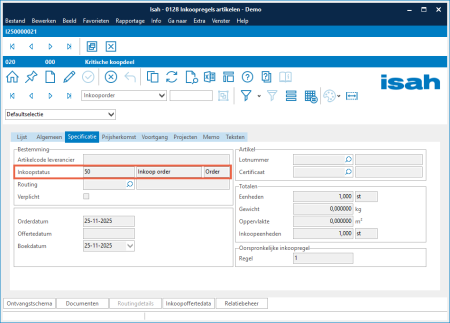
There is no automatic status handling for the purchase status. In other words, in none of Isah’s standard processes can you indicate that the status of a purchase line should be increased. Changing it to History is therefore a deliberate action, often performed to maintain a clear overview of ongoing purchases.
The user likely checked in screen 1213 – Purchase Overview that:
- there were no outstanding balances on the interim purchase accounts (NTOG, AV, and NTOF), and
- all completions (receipt and purchase invoice) were present.
Purchase lines that meet these conditions are generally considered finalized.
Recommendation
Consider temporarily parking purchase lines under a Post-calculation status (which may need to be introduced).
If late purchase invoices frequently need to be processed, it may be worthwhile to keep closed purchases parked for a certain period before definitively moving them to History.
For closing sales orders and production dossiers, it is not a requirement that the purchase line has the status type History.
Ultimately, you will want to assign the History status, because otherwise screen 1213 – Purchase Overview becomes unusable.
Alternative approach
Process the purchase invoice as Unplanned Production.
- If it concerns a purchase for stock, you can add a new purchase line to the existing purchase order and link the invoice to it.
- Add a clear note indicating which original purchase the invoice was intended for.
It remains unusual to receive an invoice for a purchase that has already been marked as fully completed.